How to Hire a Community Meeting room
The library offers Community Meeting rooms for hire at Logan Central Library and Jimboomba Library. These spaces are made available for use under the Library Bookable Spaces Conditions of Use.
How to
Make a Booking
- Select a Room
- Rooms available to hire are marked with Hire Fee Applies.
- Review room facilities and click on Book Now when ready to proceed.
- Check if your desired date and time is available. Availability is shown in green.
- Click on Book Now.
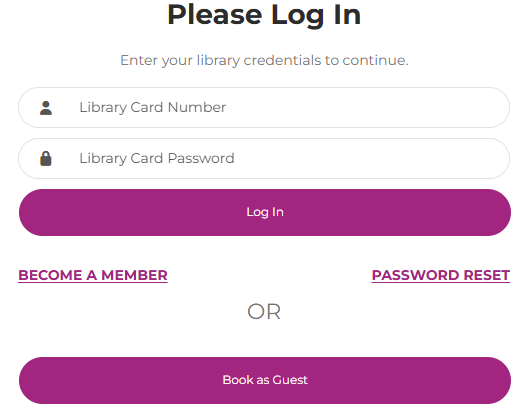
- If you are a library member you can Log In to book, otherwise choose Book as Guest.
- Add your booking details. You must review and agree to the Room Booking Conditions of Use.
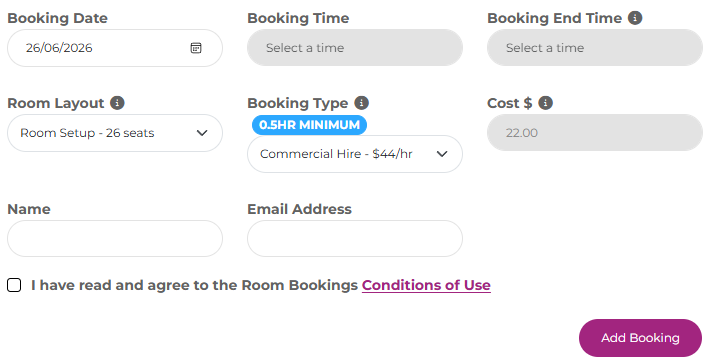
- The total amount due is displayed when you confirm your booking.
You will receive an email to let you know your booking is pending approval. Bookings will be approved within three business days.
Not For Profit Organisations please contact the library to book.
View your Booking
- Log in to the Room Booking system
- If you booked without an account you will need the booking number emailed to you and your email address.
- If you booked as a library member your room bookings can be accessed with your library membership number and password.
- Click on Room Bookings to view any bookings you have made.
Payment
- Library staff will email you an invoice with your booking details.
- Payment is required before the date that you have booked the room for.
Cancellation and Refunds
- Log in to the Room Booking system
- If you booked without an account you will need the booking number emailed to you and your email address.
- If you booked as a library member your room bookings can be accessed with your library membership number and password.
- Click on Room Bookings to view your bookings, then cancel any dates you no longer need.
If you have already paid, a full refund can be obtained if you cancel more than 24 hours before the booking is due to commence. Please contact the library at libraries@logan.qld.gov.au for more details on how to obtain your refund.
Not-for-profit Organisations
If you are representing a Not-for-profit (NFP) organisation, you need to have your Not-for-profit status approved to be eligible for a discounted rate. Once approved, you can book a room via libraries@logan.qld.gov.au and providing your contact details, requested room, time and date.
How to register for the discount?
Please attach one of the following to your initial request:
- Australian Taxation Office Charity endorsement, or
- proof that you are from an incorporated association (under the Associations Incorporated Act 1981)